
Client Download
Everything you need to begin your journey in Emperator.
Main Client
Download the official Emperator client for Windows. The package already includes everything you need to play — just install and set off on the adventure.
Download for WindowsBeta version — updated automatically by the launcher.
Extra Files
-
Updates
The launcher downloads updates automatically on startup. There is no need to download patches manually.
-
Launcher
Included in the main client package. Keeps your game always on the latest version.
-
Installation Manual
Extract the downloaded file, run the launcher and wait for the files to be verified. If in doubt, ask for help on our Discord.
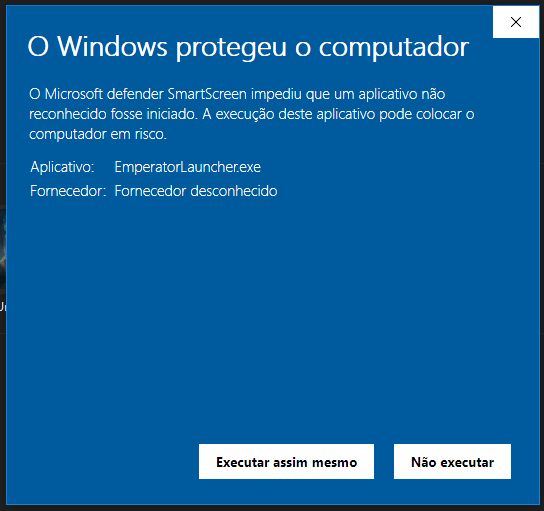
Windows SmartScreen Warning
When you run EmperatorLauncher.exe for the first time, Windows may show a security warning stating that the app is from an unknown publisher. This is normal and expected.
The launcher is the official game client distributed by us. The file is safe — the warning appears only because we do not yet have a digital certificate recognized by Microsoft.
- Click More info on the blue Windows dialog.
- Then click Run anyway to start the launcher.
System Requirements
| Requirement | Minimum | Recommended |
|---|---|---|
| Operating System | Windows 7 64 bits | Windows 10/11 64 bits |
| RAM | 4 GB | 8 GB |
| Disk Space | 1 GB | 2 GB |